When handled properly, the migration can streamline operations, reduce costs and position your company for growth. When mismanaged, it can result in lost data, operational disruption and frustrated employees. The difference lies largely in how thoroughly you prepare.
Understand what you're really migrating
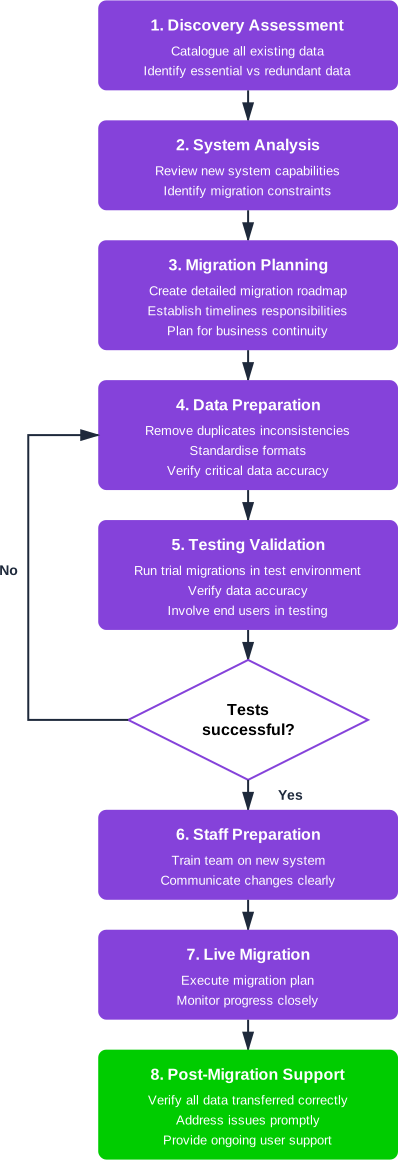
Before considering the technical aspects of migration, you need a complete picture of what data exists in your current system. Many business owners discover during migration that their legacy system contains far more information than they realised, accumulated over years of operation. Some of this data remains essential to daily operations, while other elements may be redundant, duplicated or simply irrelevant.
Start by cataloguing every type of data your current system holds. This includes the obvious – such as customer records, financial transactions and employee information – but also extends to historical data, system logs, custom configurations and integrations with other tools. You may find that different departments have been using the system in varied ways, creating pockets of data that aren't immediately visible to management.
Equally important is identifying which data must migrate to the new system immediately, which can be archived for occasional reference and which can be safely discarded. This assessment requires input from department heads who understand how their teams actually use the information. The finance director's perspective on what constitutes essential data will differ markedly from the operations manager's view.
Above all else, have a reliable fallback plan that lets you roll back to a previous state, should unforeseen issues occur during migration.
Assess your new system's capabilities and limitations
Your new administrative platform will inevitably structure and handle data differently from your legacy system. These differences matter enormously during migration. A field that stored customer addresses as a single text block in your old system might require separation into distinct components in the new one. Date formats, reference numbers and categorisation systems may all function differently.
Request detailed technical documentation from your new system's provider, specifically regarding data structure and import capabilities. Many modern platforms offer migration tools or services, but these work best when you understand their limitations from the outset. Some data types may not transfer cleanly, requiring manual intervention or restructuring before import.
Consider scheduling a detailed technical consultation with the new system's implementation team before you begin preparing data. They can identify potential complications specific to your situation and may have encountered similar migrations previously. Their experience with other businesses moving from your particular legacy system could prove invaluable.
Create a comprehensive migration plan
A successful migration requires planning that accounts for both technical processes and business continuity. Your plan should establish clear timelines, assign specific responsibilities and identify contingencies for when things don't proceed as expected.
Begin by determining whether you'll migrate data in phases or all at once. Phased migrations reduce risk by allowing you to test processes with smaller data sets before committing fully. However, they also mean running parallel systems temporarily, which increases complexity and cost. Single-event migrations create a clean break but offer less room for adjustment if problems emerge.
Your plan must address how the business will operate during migration. Will you need to pause certain operations? Can staff continue working in the old system whilst migration proceeds, and if so, how will you handle data created during this period? Many businesses choose to migrate during quieter periods or over weekends to minimise disruption, but this may not suit every organisation's rhythm.
Establish clear success criteria before beginning. What does a successful migration look like? How will you verify that data has transferred accurately and completely? These questions need specific, measurable answers that everyone involved understands.
Clean and prepare your data
Legacy systems accumulate data problems over time. Duplicate records, inconsistent formatting, incomplete entries and outdated information all lurk within databases that have served businesses for years. Migration presents an opportunity to address these issues rather than simply transferring problems to a new platform.
Data cleaning is labour-intensive but essential. Start by identifying duplicate records, which often arise when the same customer, supplier or product has been entered multiple times under slightly different names or reference numbers. Decide which version represents the authoritative record and merge or delete others accordingly.
Standardise data formats throughout your system. If some entries use abbreviated county names whilst others spell them out fully, choose one approach and apply it consistently. The same principle applies to telephone numbers, postcodes and any other structured data. This standardisation makes migration smoother and improves data quality in your new system from day one.
Verify that critical data is complete and accurate. Missing email addresses, incorrect financial figures or outdated contact information should be corrected before migration rather than after. Consider assigning different departments responsibility for cleaning their own data, as they're best positioned to spot and correct errors in their areas.
Test thoroughly before go-live
Never migrate directly into your production environment without extensive testing. Request a test environment from your new system provider where you can conduct trial migrations without risking your actual business operations.
Run multiple test migrations using representative samples of your data. Start with small batches to identify obvious problems, then scale up to larger data sets that better reflect the full migration's complexity. Each test should be followed by careful verification, checking not just that data has transferred but that it remains accurate and usable.
Involve staff members who will actually use the new system in this testing phase. They'll spot practical problems that might escape technical teams, such as missing information they rely on daily or workflows that don't function as expected with the migrated data. Their feedback allows you to refine both the migration process and the new system's configuration before going live.
Prepare your team for the transition
Technical preparation alone doesn't guarantee successful migration. Your staff need to understand what's happening, why it matters and how it will affect their work. Communication should begin well before migration starts and continue throughout the process.
Explain the business case for migration clearly. When employees understand that the new system will ultimately make their jobs easier or enable business growth, they're more likely to tolerate temporary disruption. Acknowledge that change is difficult and that there will be a learning curve.
Provide comprehensive training on the new system before migration occurs. Staff should feel comfortable with basic operations before dealing with the added complexity of newly migrated data. Consider designating system champions within each department who receive extra training and can support colleagues during the transition.
Above all else, have a reliable fallback plan should you need to roll back to a previous state, should unforeseen issues occur during migration.
The most carefully planned migration will encounter unexpected challenges. Building slack into your timeline, maintaining clear communication channels and remaining flexible in your approach will help you navigate these inevitable complications whilst keeping your business running smoothly.

 Back to all articles