If you have spent any time talking to a web developer, a software supplier or the person who looks after your IT, you have probably heard the term "API". It tends to get mentioned in passing, as though everyone knows what it means, and most people nod along rather than ask.
The good news is that the idea behind an API is simple. You do not need to understand any code to grasp what one does, and once you do, you will start to see why they matter to almost every business that has a website or uses software to manage customers.
So what is an API?
API stands for Application Programming Interface. In plain terms, it is an agreed way for one bit of software to talk to another. It sets out what one system can ask for, how it must ask and what it will get back.
Think of the trade counter at a builders' merchant. You are not allowed to wander into the warehouse and help yourself. Instead, you go to the counter, give a product code and a quantity and someone fetches what you need. If you ask for something that does not exist or you are not on their account list, you are turned away.
An API works in much the same way. The counter is the API, the warehouse is the other system's data and the rules about what you can ask for, and who is allowed to ask, are written down in advance. Neither side needs to know how the other works internally. They only need to agree on how they will communicate.
What happens when one system talks to another
When software uses an API, the exchange usually follows the same short pattern and it typically takes a fraction of a second:
- The request. One system sends a message asking for something, such as "create a new contact" or "tell me this customer's address"
- The credentials. The request carries a key or token that proves who is asking, much like a trade account number
- The check. The receiving system confirms the request is allowed and properly formed
- The response. It sends back the information requested, a confirmation that the job is done, or an error explaining what went wrong
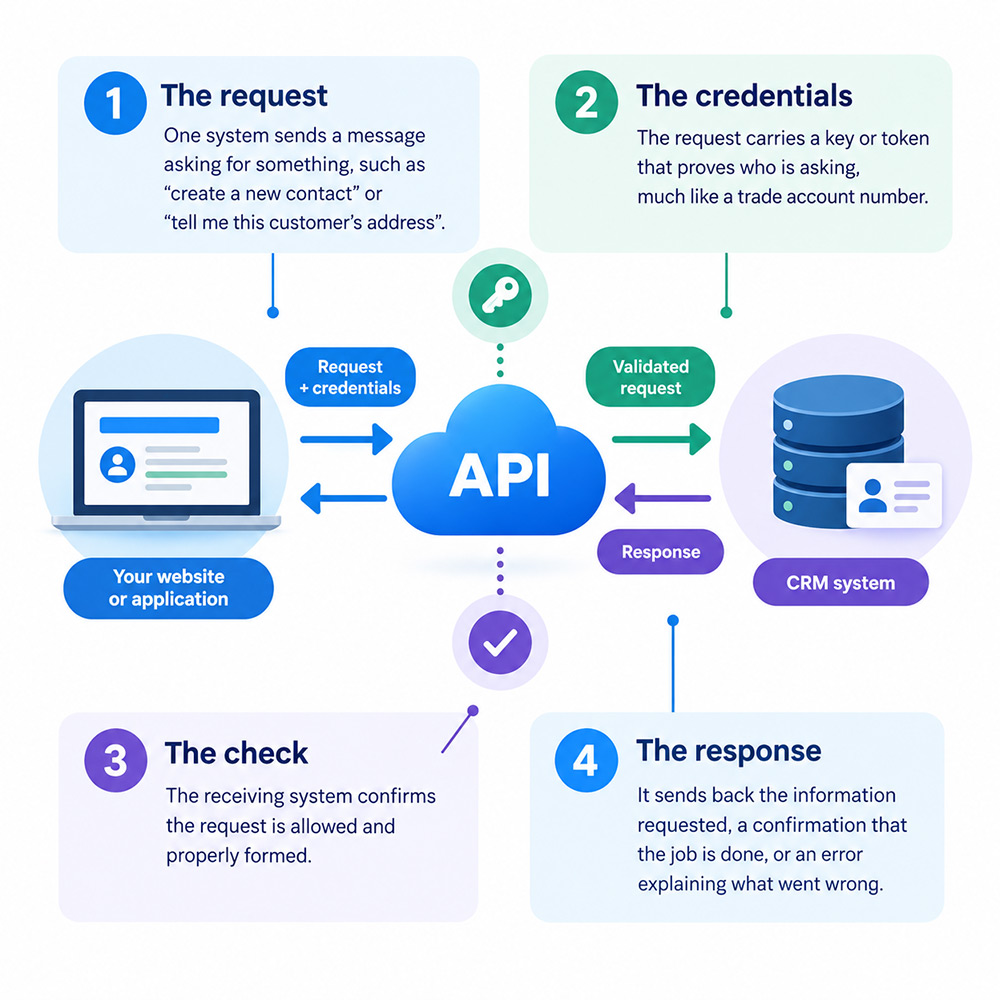
All of this happens behind the scenes. Your customers and staff never see it; they simply see the result.
Why APIs are useful
Most businesses now run on several separate software application: a website, an email marketing tool, an accounts package, perhaps a booking system and a CRM (Customer Relationship Management system). Each one is good at its own job, but on their own they do not share information. Without some way of connecting them, people end up acting as the link, copying details from one screen to another.
APIs remove that manual step. Connecting your systems through their APIs can mean:
- Less retyping. Information entered once flows to wherever it is needed
- Fewer mistakes. No mistyped email addresses or phone numbers that sometimes stem from copying by hand
- Faster responses. Data moves as soon as it is created, not when someone gets round to it
- Controlled access. Each connection can be limited to only the data and actions it needs
- Access to specialist services. You can use payment, mapping or delivery tools built by others without building your own
You are probably using APIs already
APIs are not a niche technology reserved for large corporations. If you run a business with any kind of online presence, you are almost certainly relying on them already. Common examples include:
- taking card payments on your website through a provider such as Stripe or PayPal
- showing a Google map of your premises on your contact page
- letting visitors sign up to your newsletter, with their details passed straight to your email marketing platform
- accounting software pulling in transactions from your business bank account
- customers signing in to a website using their Google or Microsoft account
- online shops showing live delivery tracking from a courier
In each case, two separate systems are exchanging information through an API and neither business had to build the other's service from scratch.
What this could mean for your small business
The real value of APIs for a smaller business lies in joining up the systems you already pay for. Two examples show how this works in practice.
Sending website enquiries straight to your CRM
On many small business websites, the enquiry form simply sends an email. Someone then has to read it, open the CRM, check whether the person is already a contact and type their details in. When the office is busy, enquiries can sit in an inbox for days or never make it into the CRM at all.
If your CRM has an API, your website can pass each enquiry to it the moment the form is submitted. Depending on how it is set up, the website could:
- create a new contact, or update an existing one rather than creating a duplicate
- record where the enquiry came from, such as a particular page or advertising campaign
- assign the lead to the right member of staff automatically
- trigger a follow-up task or an acknowledgement email
- record whether the person agreed to receive marketing
For marketers, the source information is particularly useful. It shows which pages and campaigns are producing enquiries, based on what actually reached your CRM rather than on guesswork.
APIs are not a niche technology reserved for large corporations. If you run a business with any kind of online presence, you are almost certainly relying on them already.
Letting customers manage their own details
A second use could be a customer login area on your website. Rather than phoning or emailing to change an address or unsubscribe from a mailing list, customers sign in and make the changes themselves.
Behind the scenes, the website uses the CRM's API to read and update that customer's record. This means customers can:
- update their contact details and delivery address
- change their marketing and communication preferences
- view their past orders, bookings or support requests
- download documents such as invoices or certificates
Because the changes go directly into the CRM, your team always works from current information and there is only ever one version of each customer's record. It also gives customers a straightforward way to control how you contact them, which helps when meeting your obligations under UK data protection law.
Questions to ask before you start
Connecting systems through APIs is usually far less costly than replacing them, but it is worth asking a few questions first:
- Does your software have an API? Most established CRMs do, but check what it allows you to read and change
- Is API access included in your plan? Some providers only offer it on higher-priced tiers
- Are there usage limits? Many APIs cap how many requests can be made in a given period
- How is the connection secured? Credentials should be stored safely and limited to the access actually needed
- Who maintains it? Providers occasionally update their APIs, so someone needs to keep the connection working
- What personal data is involved? Moving customer data between systems should be reflected in your privacy notice and data protection records
The short answer
An API is simply the agreed way two software applications exchange information. For a business owner or marketer, the technical detail matters far less than the opportunity: the tools you already use can be made to work together, saving time, reducing errors and giving you a clearer picture of your customers.
If you find yourself or your staff regularly copying information from one system into another, that is usually a sign an API could do the job instead. A conversation with your web developer about what your existing software can connect to is a sensible first step.

 Back to all articles